
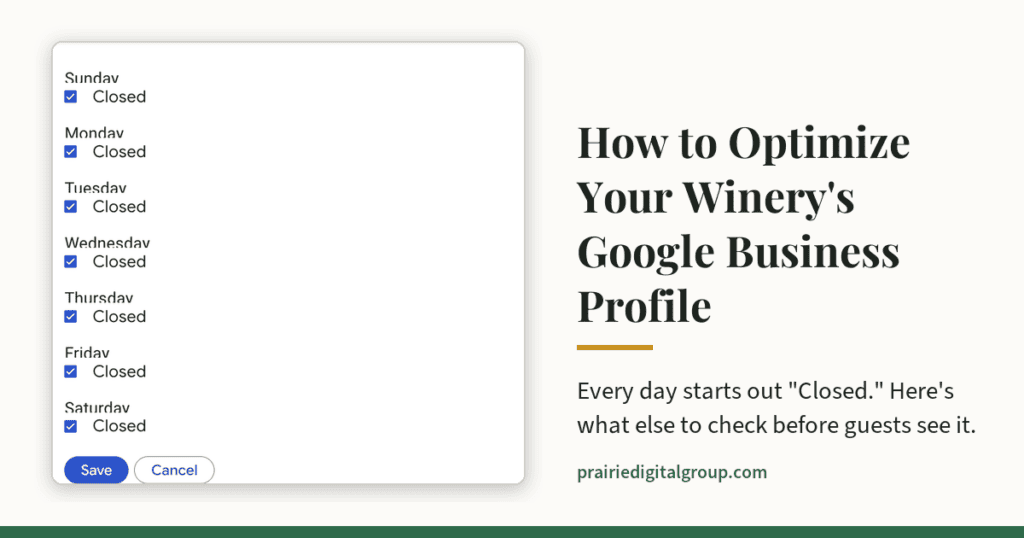
When I set up Prairie Digital Group’s own Google Business Profile, I expected it to be fairly simple. It wasn’t difficult, exactly, but little things caught me off guard. When I got to the hours, every day of the week was already marked “Closed.” I wasn’t expecting that, and it left me asking, “Okay, how do I put in the hours for my business?”
Then came the logo. That should be simple, right? But Google crops it its own way, so unless you size it just right, part of your logo ends up hidden. That threw me off too.
And it occurred to me: I do this for a living, and it still tripped me up. What happens to a winery owner, or the manager who gets handed the job, who only does this once? Will the profile even get approved? And if it is, will it be set up well enough that people can actually find them?
That’s why I wrote this: to walk through the parts that aren’t obvious, so your profile comes out right the first time.
For a lot of guests, your winery’s first impression isn’t your tasting room. It’s the panel that appears on Google when they search your name or “wineries near me.” That panel is your Google Business Profile, and it answers the questions people ask before they get in the car to go do some wine tasting: Are they open? How do I get there? Can I call? Is it worth the drive?
Most wineries claimed their profile years ago, filled in the basics, and moved on. Optimizing it is less about tricks and more about inspection: going through each field, confirming it’s correct, and fixing what isn’t. Google says local results are based mainly on relevance, distance, and prominence.Google’s guidance). You can’t change your distance from a searcher. You can make your profile complete, accurate, and clearly about what you actually do.
Key Takeaways
- Category first. “Winery” is almost always the right primary category; add others only for things you truly offer.
- Hours are a promise. Never leave an open day marked “Closed,” and use special hours for holidays and events.
- Photos carry hidden data. Phone photos can include GPS location; check them before uploading.
- Every contact option needs an owner. Don’t turn on texting or messaging unless someone will answer quickly.
- Accessibility details help guests plan. Mark only what’s true, using Google’s own definitions.
- Ask every guest for reviews, the same way. No freebies in exchange, no asking only the happy ones, and reply to every review.
- Set it up years ago? Look again. Google keeps adding fields, and it can change your profile if you don’t respond to suggested edits within four days.
- Consistency builds trust. Your name, phone, and website should match everywhere they appear.
Here are nine areas to check.
1. Choose the right primary category
Your primary category is the single most important field on the profile. It tells Google what kind of business you are, and it affects which searches you appear in.
- If your main business is making and selling wine, “Winery” is almost always the right primary category.
- Add a small number of additional categories only for things you genuinely offer as a business, such as “Wedding venue” if you book weddings or “Restaurant” if you run a full kitchen. Don’t add a category for something you do twice a year.
- Pick categories from Google’s list as you type. A category you type in yourself won’t be recognized. For example, if you have a big shindig one weekend out of the season where you offer music, don’t use the entertainment category just because of that one weekend. You’re more than likely going to get complaints from guests who are looking for entertainment on other weekends as well.
When in doubt, choose the most specific category that honestly describes what most customers come to you for.
2. Set your hours, and never leave an open day marked “Closed”
Hours are where profiles quietly go wrong. During setup, Google shows every day of the week with a toggle that starts at “Closed.” If you click past that screen without changing it, your profile can tell the world you’re closed every day.
- Enter the hours guests can visit, not your production or office schedule.
- Use special hours for holidays, private events, and seasonal changes, so the regular schedule stays correct.
- Use “Add more hours” for anything that keeps its own schedule. If your kitchen, happy hour, or pickup window runs on different hours than the tasting room, Google lets you list each one separately, right under your main hours. The choices offered vary by business.
- If your hours genuinely vary and you can’t keep them accurate, it’s better to leave hours blank than to show wrong ones. A guest who drives an hour to a locked door doesn’t come back.
- After saving, go on your phone, open a browser, search for your winery, and see what a guest sees.
3. Write a description that informs, not one that shouts
The description (up to 750 characters) is where you tell people what makes your winery worth the visit.
Do include:
– What you make and what you’re known for
– The experience: tastings, the setting, events, and food if you serve it
– Something true and specific about your story or place
– What makes you different
Don’t include:
– Phone numbers, website links, or hours (they have their own fields)
– Prices or limited-time promotions (they go stale)
– Keyword stuffing (“best winery Illinois winery tasting wine near me”)
– Claims you can’t back up, like “the best winery in the state”
Write it the way you’d describe your place to a friend who’s never been. This is important. Be genuine!
4. Use photos that help, and watch what’s hidden inside them
Have you ever looked at a food advertisement and immediately gotten hungry for that food? Photos do more to convince a guest than almost anything else on the profile.
Your logo: upload a square version with plenty of space around the mark. Google often crops logos into a circle, so a logo that runs edge to edge gets its corners cut off. A simple fix is a square image with a white background, with the logo centered and a margin on every side. This is what I was referring to earlier. You need to follow this carefully.
Your photos: show what a guest will actually see: the entrance, the tasting room, the view, the wine. Current photos beat beautiful old ones. Pretend that you’re a guest arriving at your winery for the first time. What are they going to see? Show them!
The hidden detail: photos taken on a phone usually carry GPS location data embedded in the file. Google’s upload screen notes that location information from photos may be used to update your location on Maps. That’s harmless for a photo of your tasting room. It matters for photos taken at an owner’s home, or anywhere you don’t want pinpointed. Use photos taken at the winery. Images created on a computer should have their location data turned off before uploading.
5. List your services, and be ready when someone uses them
Google lets you list services and, depending on your profile, contact options beyond a phone call.
- Services: list what you really offer, like tastings, tours, private events, or wine club. Remove anything you’ve stopped doing. This is another really important thing. If you’ve added a service, don’t forget to put it on the profile. If you’ve stopped, you need to go in and remove it.
- Text messaging: Google currently offers a chat option during setup that lets customers send a text to a number you choose. It’s a convenient way for guests to ask a quick question.
- The catch: every contact option you turn on is a promise. A text button that gets answered three days later is worse than no text button. Before you enable messaging, decide who answers it and how quickly. Test it yourself by sending a text from a different phone and confirming it arrives.
The same goes for the phone number: call it, let it go to voicemail, and make sure the greeting says your winery’s name.
6. Keep your name, phone, and website consistent everywhere
Google and AI search tools build a picture of your business from many sources: your profile, your website, review sites, directories, social media. When those sources agree, you look like one clear, trustworthy business. When they don’t, your information gets muddled.
- Name: Use your real-world business name exactly as it appears on your sign and website. No added keywords.
- Phone: the same number everywhere, one that reaches someone who can help.
- Website: link to your real site, ideally the page with visiting information.
- Check the old listings too: trail sites, state wine association pages, tourism directories. Outdated addresses, old websites, and former owners’ names linger there for years.
This matters more if another business has a similar name. Consistency is how search engines tell you apart.
7. Fill in your accessibility details, honestly
Your profile has a section of attributes: yes-or-no details about your business. Several cover accessibility, and they matter to guests who use a wheelchair, walk with a cane, or are bringing an older parent along. For them, “Can I get in?” is the first question, not the last.
Google uses specific definitions (Google’s attribute guidance):
- Wheelchair-accessible entrance: at least about three feet (one meter) wide, with no steps or stairs
- Wheelchair-accessible restroom: an entrance at least one meter wide, with no steps or stairs
- Wheelchair-accessible seating: no steps or stairs, with enough space for someone in a wheelchair
- Wheelchair-accessible parking: parking reserved for people with accessibility needs
A few practical points:
- Mark only what’s true. If the tasting room has a step at the door, say no, and put the alternative on your website’s visit page (“Use the side entrance by the patio”). A wrong “yes” is worse than an honest “no.”
- Check what’s already there. Google says some attributes may be filled in from what visiting customers report, so your profile may already show answers you didn’t give. Correct anything that’s wrong.
- Give it time. Google says edits are usually reviewed within minutes but can take up to 30 days.
- Which attributes you see depends on your category, so your list may look different from another winery’s.
Then make sure your website tells the same story. A profile that says “accessible entrance” paired with a website guests can’t navigate with a screen reader sends a mixed message. You might be telling someone in a wheelchair they can get into your tasting room without a problem, while someone with low vision who visits your website finds it doesn’t work for them at all.
8. Ask for reviews the right way, and answer every one
Reviews are huge! I use reviews to decide whether I go somewhere or buy something.
Reviews are the part of your profile guests read most closely, and the part you control least. What you control is how you ask and how you answer.
Asking:
– Google’s own advice is to ask customers to visit a Google link or scan a QR code (Google’s guidance). Put that QR code where it fits naturally: on the tasting-room counter, a card in wine club shipments, or a short line in your post-visit email.
– Ask everyone, the same way. Google’s rules prohibit selectively asking for positive reviews and discouraging negative ones.Google’s review policy. Asking only the guests who seemed delighted counts.
– No incentives. The same rules prohibit payment, discounts, or free goods or services in exchange for a review. “Leave a review, get a free tasting” breaks the rules, however well-meant.
– Don’t set staff quotas. Google also prohibits requiring staff to collect a certain number of reviews, or asking for reviews that say specific things.
Answering:
– Replies are public, so you’re writing for every future guest who reads them, not just the reviewer.
– Thank people by name, keep it short, and mention something specific from their visit.
– For a negative review, stay calm, acknowledge the problem, and offer to make it right offline. A gracious reply to a fair complaint often does more for your reputation than another five-star review.
– Skip the sales pitch. Google advises against using replies for promotion.
9. If you set up your profile years ago, go back and look
Google keeps adding to Business Profiles. A profile that was complete when you claimed it doesn’t mean that it’s complete today. Additional fields may have been added or changed since you last reviewed it.
– Social media links. You can now add one link each for Facebook, Instagram, LinkedIn, Pinterest, TikTok, X, and YouTube.Google’s guidance). If your winery is active on any of them, add it.
– Newer attributes. Google has expanded the details you can mark, from amenities to accessibility to how your business identifies. Mark only what’s true, the same way as in section 7.
– Products and services. If these were never filled in, they’re worth a fresh pass (section 5).
Say what? Yes, Google can also change your profile on its own. When people suggest edits, such as different hours or a new phone number, Google may email you about them. You have four days to accept or reject a suggestion. If you don’t respond, Google may publish it anyway, as long as other public information, like your website, seems to support it.Google’s guidance). That’s one more reason your website and profile should always tell the same story.
Make it a habit: log in a few times a year, look for empty fields, and check for any changes Google has made or suggested.
A 20-minute profile inspection
Set a reminder to walk through this checklist each season:
- Primary category is still accurate
- Regular hours are correct; special hours entered for upcoming holidays and events
- No open day shows as “Closed”
- Description is current; no prices, promotions, or stuffed keywords
- Logo displays fully; at least a few current photos
- Services list matches what you offer today
- Phone, text, and messages are answered; test once
- Accessibility attributes are accurate, including any filled in by customers
- Every review from the past season has a reply
- Name, phone, and website match your website and outside listings
- No empty fields Google has added since you set up (social links, newer attributes)
- No pending or recent “Google updates” you haven’t reviewed
Frequently asked questions
Can I offer a free tasting or a discount in exchange for a review?
No. Google’s review policy prohibits offering payment, discounts, or free goods or services in exchange for a review. You can, and should, ask guests for honest reviews without any reward attached.
Is it okay to ask only the guests who had a great visit?
No. Google prohibits selectively asking for positive reviews. Ask every guest the same way, through the same QR code or link.
Should I reply to negative reviews?
Yes. Replies are public, so a calm, specific, helpful response shows future guests how you treat people when something goes wrong. Offer to continue the conversation offline, and don’t argue in public.
Will adding words like “Wine Tasting” to my business name help me show up?
Don’t do it. Use your real-world business name exactly as it appears on your sign. Adding keywords goes against Google’s guidelines and can put your profile at risk.
I’m already listed on wine trail and tourism sites. Do I still need a Google Business Profile?
Yes. Those listings help, especially when they match your profile, but the Business Profile is what appears on Google Search and Maps when someone looks you up. Treat the others as supporting cast.
How often should I update my profile?
Any time your hours, phone, or offerings change, plus a quick seasonal review using the checklist above. Holidays and release weekends are the moments a wrong profile costs you the most.
What if my profile shows information I never entered?
Google can update profiles using information from customers and other sources. Check your profile regularly, especially the hours, attributes, and photos, and correct anything that’s wrong.
The bottom line
Your Google Business Profile isn’t a one-time setup. It’s a public record of your winery that guests trust before they ever meet you. Keep it accurate, keep it current, and check it on a regular basis, the same way you’d check anything else your guests depend on.
Want a second set of eyes on your profile? It wouldn’t hurt, and a fresh look often catches what you’ve stopped seeing. Checking a winery’s Google Business Profile is part of every PDG Visibility Audit, which looks at how well your winery is being found by the guests you want to reach. Give me a shout. I’ll take a look, and I may have a few other ideas that could help.
